
AI restaurant POS · Hugh’s story
Why I built mkgpos.
mkgpos is a free tablet POS for restaurant owners and staff. Hugh built it at Mrs Kim’s Grill in Carnegie, Melbourne, Australia. Add your menu, take table QR orders and see tickets in the kitchen.
Hugh, owner of Mrs Kim’s Grill in Carnegie, Melbourne
Read Hugh’s story
I’m Hugh. I’ve run Mrs Kim’s Grill, a Korean BBQ restaurant in Melbourne, for 13 years.
I tried one POS after another. Every time, I found myself thinking about the system I wanted for our restaurant.
When I got the chance, I built it. We’ve used my POS in our restaurant for more than a year.
In the last panel, I’m sitting with my mother-in-law, Mrs Kim. I know how hard it is to run a small business. I want the basics to be free, and every paid feature to earn its place in your restaurant.
AI restaurant POS for table service
Two tables. One bill. “Could I get a Sprite instead?” “Could we move to that empty table?”
Two tables want to pay together during the dinner rush. Your server asks AI to find both orders, checks the total and confirms.
Your server types the request in a tablet browser. AI finds the order. Your server reviews and confirms.
Development preview · 36 seconds · Tested locally with two unpaid tables.
Read the film transcript
A guest asks, “Can we pay together?” The server types, “Combine tables 4 and 5. Keep the bill at table 5.” The AI finds both orders and asks the server to review the total.
Table 4 has two guests and an A$4 order. Table 5 has three guests and an A$10 order. The server checks both orders and selects Confirm change. Table 5 now has one A$14 bill for five guests. Both original orders are included.
 Garden Café
For restaurant owners
Ask your POS about the shift.
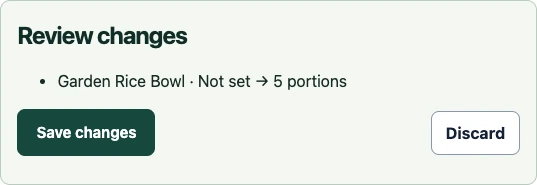
Ask about sales, check stock, or open a table. The assistant uses your POS records and shows you proposed changes before you approve them.
- Sales“What did we sell today?”
- Check recorded sales, popular dishes, or what’s happening in service.
- Stock“Set the rice bowl stock to five.”
- See the item and proposed quantity. The change is saved after you approve it.
- Checkout“Open checkout for table ten.”
- Go to the selected table. A staff member completes the payment in the POS.
During service
One order, from table to checkout.
Guests order on their phones. The kitchen and front-of-house team follow the same order in their browser. Set up table QR ordering.
-
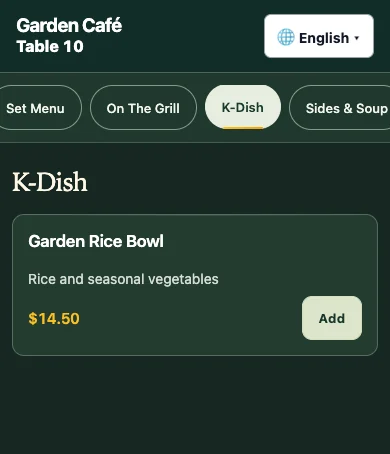
Guests order at the table
A table QR code opens the menu and connects the order to that table.
-
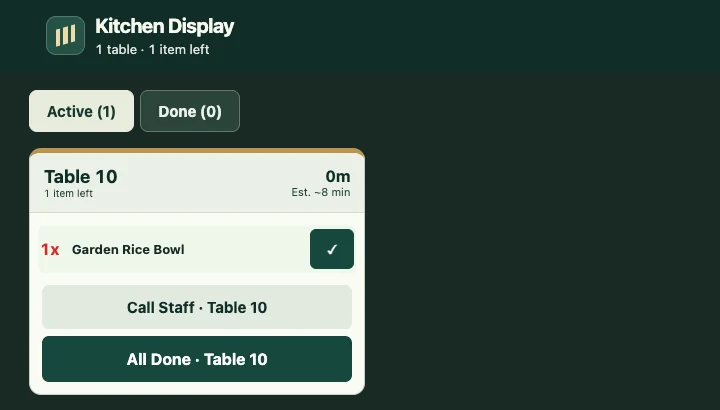
The kitchen sees the ticket
Cooks see the order on the kitchen display and can mark it complete.
-
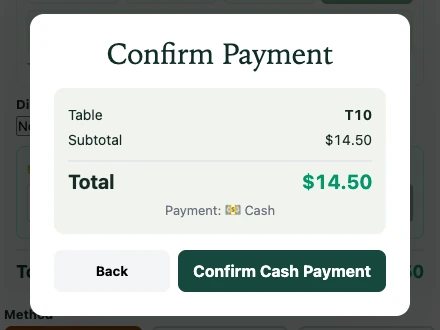
Staff record checkout
Staff can record cash against the order and queue the receipt.
Early access
Open your free restaurant workspace.
Sign up with your email, verify it and add your menu. Your first table can order by QR, and your kitchen will receive the ticket.
Create a free accountAlready registered? Owner sign in. Have a pilot invitation? Use your code.
See how ordering works
Try a sample order to see how your team would use the POS. No account needed.
Tested in Melbourne, Australia
In test venues, the team followed QR orders through kitchen completion, cash recording and receipt queueing. Staff confirmed drink swaps on unpaid orders and moved whole parties to empty tables. Owners reviewed and saved stock changes.
Voice input in the pilot
A test with synthesised Korean speech produced an editable request. Staff reviewed the proposed drink change on screen and confirmed it. Testing with staff in a noisy restaurant is still ahead. AI assistant capabilities.
In development
Merging two occupied tables has passed local tests for eligible unpaid orders. Splitting a party across tables is still being designed.
Hardware to check
Physical receipt printing and card-terminal payments still need testing with the devices your team uses.
FAQ
Before your first shift.
Do I need to install an app on my tablet?
Open the POS in a browser with an internet connection. Desktop and mobile layouts have been tested. You can check your own tablet and connected hardware during early access.
Can the AI change my menu or take payments on its own?
The assistant can prepare supported menu or stock changes for your approval. Staff complete payments and cancellations in the POS.
What can I do for free?
Open a restaurant workspace, add your menu and tables, and receive orders in your kitchen for free. No card is required. Optional paid features are planned. Free plan and device requirements.
Can a restaurant outside Australia try it?
Restaurant teams anywhere can create an account. The current workspace uses Australian dollars and Australian time zones. Check local payment and hardware support before using it for service.